Download Instructions
How to get your files
These documents are stored in Google Docs, so you always have the most up-to-date version. You have two options, depending on how you want to use them.
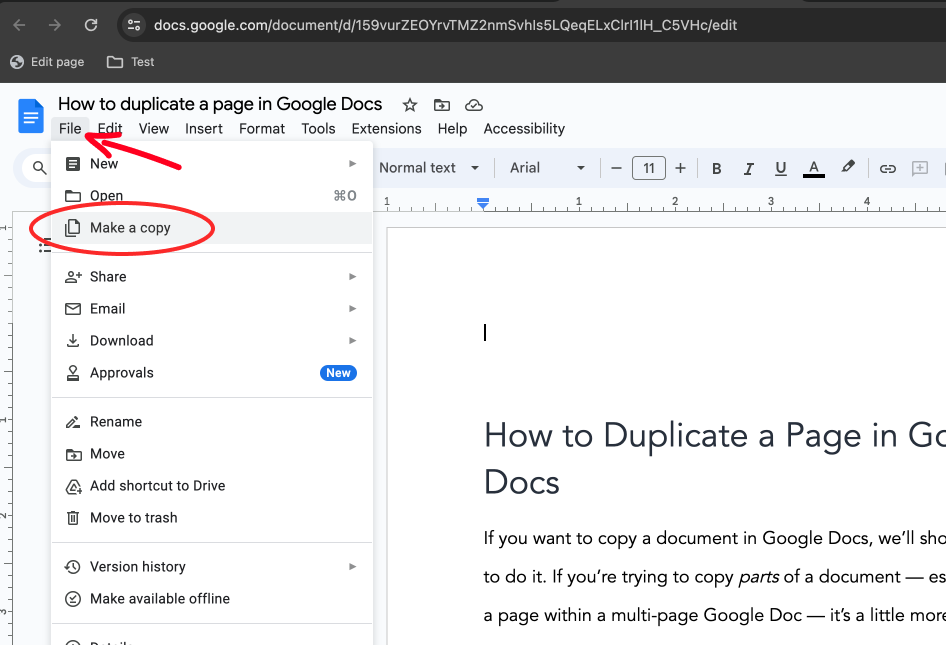
Option A -- Download to your computer. Open the document, then go to File >> Download and choose your preferred format: Microsoft Word (.docx), PDF, or plain text. The file saves to your downloads folder.
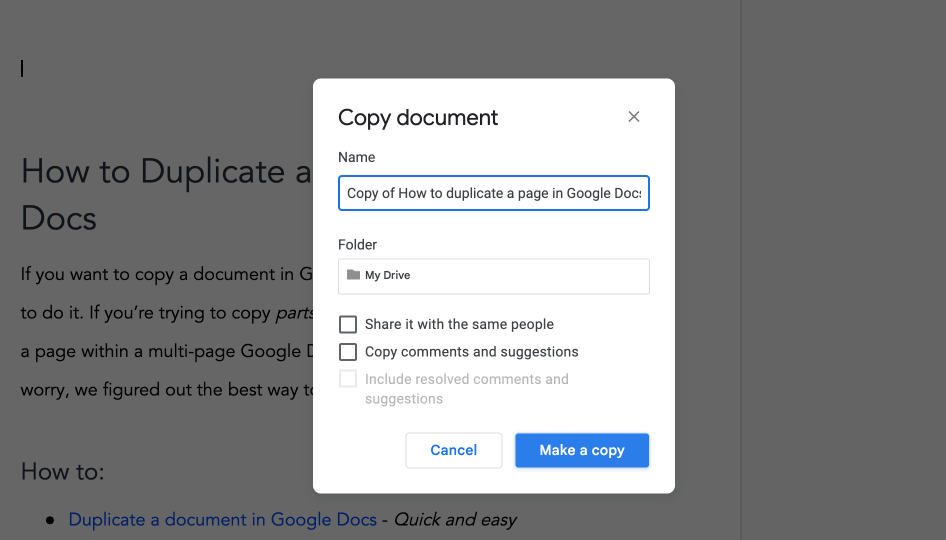
Option B -- Save a copy to your Google Drive. Open the document, then go to File >> Make a copy. This creates your own editable version in your Google Drive. You can rename it and edit it freely -- changes you make will not affect the original.
Tip: If the link takes you straight to a "Make a copy?" prompt, just click the blue button. Your copy will be ready instantly.
If you see a message saying you need permission to edit -- you do not need it. Use Option A or Option B above instead.
Your Files
- 2025 Business Plan Template
- Completing Your Business Plan Instructions (Using 2025 Template)
- 2024 Business Plan Template
- November 2024 Financial Pack - (Template Main File)
- Business Action Plan
- Investor Pitch Deck
- Growth Tools - Our list of the best tools you need to start and grow your business.
- 1 Page Business Plan (Power Plan)
- Business Plan Checklist
- Business Management & Analysis Pack
- Mobile Application / Website Technical Specification
Ebooks
Business Assessments